


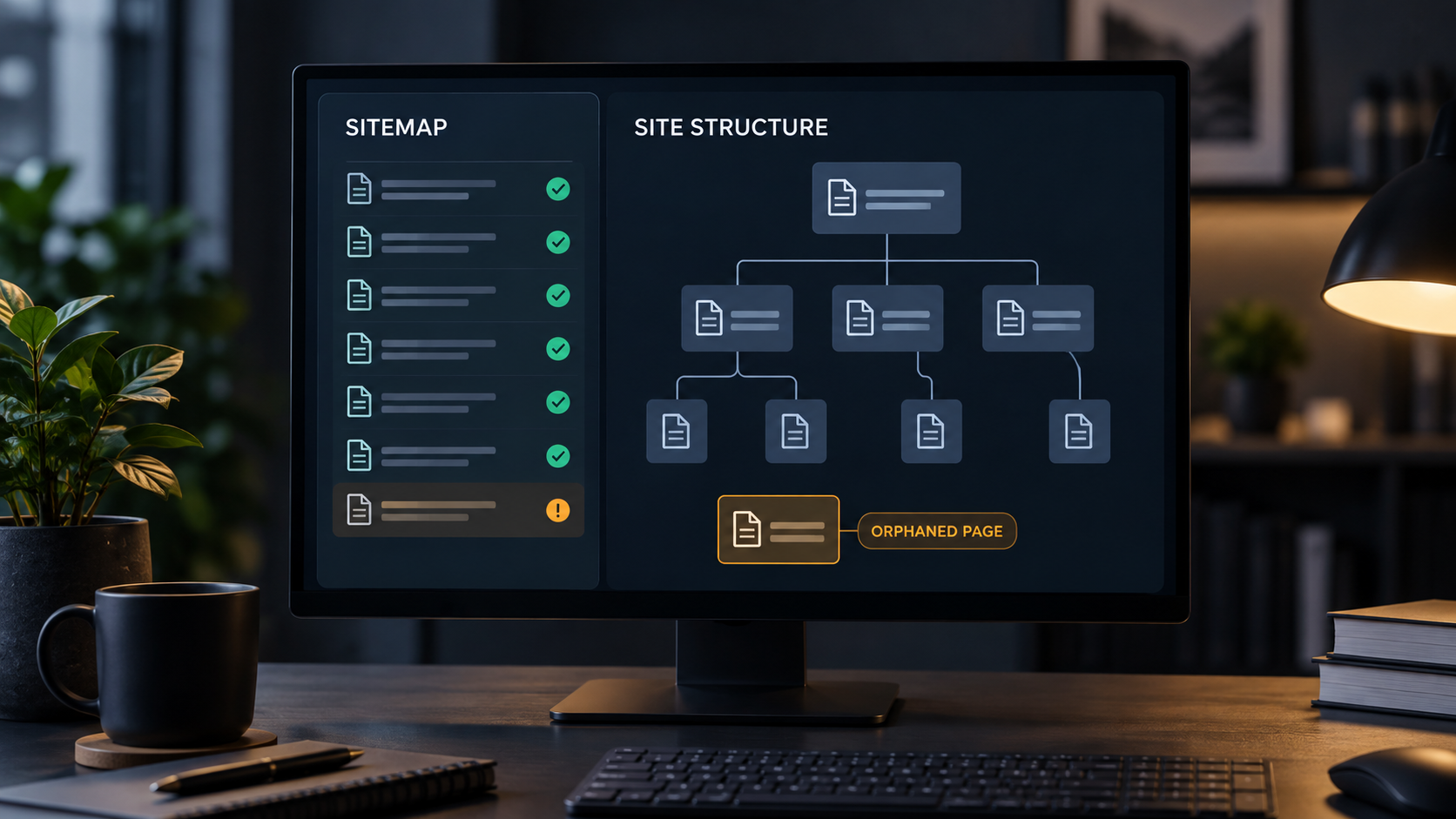
Your Page Is in the Sitemap. So Why Is It Still Hard for Google to Find?
We recently ran a Technical SEO audit for a service business and found something that looked harmless at first.
Several important URLs were included in the site’s sitemap.
But they were effectively sitting on their own.
They had little or no meaningful internal linking pointing to them from the rest of the website.
That creates a strange situation.
The site is telling search engines:
“This page matters.”
But the rest of the website is quietly saying:
“Not enough to link to it.”
That is the kind of technical SEO problem that can sit unnoticed for a long time because nothing looks broken to the person browsing the site.
The page loads.
The sitemap exists.
Everything appears normal.
But the site structure is sending mixed signals.
A Sitemap Is Not a Substitute for Internal Links
Sitemaps are useful.
Google describes them as a way to provide information about the pages and files you consider important and to help search engines crawl a site more efficiently. (Google Developers)
But there is an important detail.
Google also says that if your pages are properly linked, it can usually discover most of the site by following those links. (Google Developers)
That is the distinction.
A sitemap can tell Google a URL exists.
Internal links help show where that page belongs.
They connect it to related services, topics, categories, and other important pages.
And they give both users and search engines a clearer path through the site.
What Is an Orphaned Page?
An orphaned page is a page with no meaningful internal link pointing to it from another crawlable page on the website.
It may still appear in the sitemap.
Someone may still be able to visit it directly.
Google may even discover it.
But it is disconnected from the site’s normal navigation and linking structure.
Google recommends that every page you care about have a link from at least one other page on the site. (Google Developers)
That is not just a technical checkbox.
It is good site architecture.
Why Internal Links Matter
Imagine walking into a large store.
There are signs directing you to every department.
You can understand where things belong and how one area connects to another.
Now imagine one room exists behind an unmarked door.
The room may contain something valuable.
But very few people will ever know it is there.
That is essentially what an orphaned page does.
Internal links give context.
A remodeling company might have separate pages for kitchens, bathrooms, home additions, and whole-home renovations.
If the home-addition page is linked naturally from the main remodeling page, related blog posts, project pages, and navigation, the relationship is obvious.
If that page only appears in the XML sitemap, the relationship is much weaker.
Search systems can still discover it, but the site is doing less to explain why that page matters.
This Matters Beyond Traditional Search
This becomes even more important as search becomes more AI-driven.
Google’s current guidance for AI Overviews and AI Mode specifically recommends making important content easy to find through internal links. (Google Developers)
That should not be surprising.
AI search still depends on accessible, understandable information.
If important pages are poorly connected to the rest of your website, you are making that job harder than it needs to be.
This does not mean adding hundreds of random internal links.
It means connecting pages where the relationship actually makes sense.
How Orphaned Pages Usually Happen
Most websites do not start out this way.
It happens gradually.
A new service page gets published but never added to the navigation.
An old page is removed and the links pointing to another page disappear with it.
A redesign changes the site structure.
A blog category is retired.
A developer creates a landing page for a campaign that is never connected back to the main site.
Over time, the sitemap and the actual linking structure start telling different stories.
That is why this issue often shows up on websites that otherwise look completely healthy.
What Should You Do About It?
Start by deciding whether the page deserves to exist.
Not every orphaned page should automatically be linked everywhere.
Some pages may be outdated.
Some may be duplicates.
Some may have been created for a campaign that ended years ago.
If the page is still valuable, find the natural places where it belongs.
Link to it from relevant service pages.
Add it to an appropriate category or hub.
Reference it from useful blog content.
Make sure the anchor text actually describes what the visitor will find.
The goal is not to manufacture links.
The goal is to make the structure of the website make sense.
Technical SEO Problems Are Often Quiet
That is the larger lesson from this audit.
A technical SEO issue does not always cause an obvious failure.
There is no warning light on the homepage.
The site does not necessarily go offline.
Sometimes the problem is simply that important pages are harder to discover than they should be.
That is why technical SEO deserves regular attention.
Not because every warning in a report is a crisis.
But because the small structural issues can add up.
Check What Is Happening Under the Hood
Our Technical SEO Audit looks at crawlability, indexation, mobile and JavaScript rendering, performance, schema validity, and other issues that are easy to miss by simply browsing the website.
If you have not checked the technical side of your site recently, this is a good place to start.
Run the Technical SEO Audit:
https://audits.wahhadesign.com/technical-seo
You may find nothing serious.
That is good news.
Or you may find one quiet issue that has been sitting there much longer than you thought.
